Fujifilm X100VI AI skill: film recipes over USB with Claude Code and Codex
TL;DR x100vi-skill is an AI skill for Claude Code and Codex that manages film simulation recipes on a Fujifilm X100VI over a USB cable. You tell it what look you want or give it a link to a recipe, it shows how your own RAF files would look with it (rendered by the camera’s own processor), and then saves the one you like into the custom settings C1-C7.
Install the skill with
npx skills add volodymyrsmirnov/x100vi-skill -g.
How I got here
I like photography, but I’m not a professional and I don’t try to be one, I just like to catch some moments when I travel or walk around and then keep them somewhere (some of them are in Moments). By the way, choix, my other project for photo culling, got a major update not so long ago. Now it’s a normal macOS app with a bunch of new features, you can grab it from the releases page, but I’ll write about it next time.
Most of the photos there are from a regular iPhone, at the time of writing it’s an iPhone 17 Pro Max, but I also own a Fujifilm X100VI. To be honest, the professional photography thing always scared me a bit. I don’t like messing with lenses and with a million settings I’m supposed to tune for each and every frame, plus all the terminology, and so on. That’s exactly why I ended up with the X100VI, which everybody praises, and I think it deserves it. The lens is fixed and the auto mode is really good.
But then you get the next problem, i.e. do you shoot RAW and edit later in Luminar Neo (awesome app, and this referral link gives you 20% off), or do you use the JPEGs rendered in the camera with its post-processing like film emulation. I used to go with RAWs, but now I’m just lazy. After a trip the memory card lies for a few months and waits for a rainy weekend or for me to get a cold, so that I finally stay home and pick and edit the photos.
There are lots of sites where you can find a recipe for your taste and then create the custom settings on the camera, Fuji X Weekly for example. And all would be good, but the interface of Fujifilm cameras is something else. To find anything in their tricky menu takes minutes, and the joystick tries to misclick all the time. It’s a problem of almost all professional camera vendors I happened to see (with the exception of Leica, but I haven’t risen that high yet). The photographers’ sense of beauty ends with what gets into their lens. And picking the settings feels like the UI of some industrial machine that grinds grain into flour, but for sure not like an intuitive device.
Anyway, my suffering ended with Claude and me deciding that we can’t live like this anymore, and the result is a skill that lets you do everything over a USB cable without looking into the horrible depths of the RTOS UI.
How to install it and what it can do
You install it with the skills CLI, and it works both in Claude Code and in Codex:
npx skills add volodymyrsmirnov/x100vi-skill -g
That’s basically it, because the skill has a small launcher inside which installs the x100vi tool on its own when the agent needs it for the first time. You only need to have uv or pipx on the machine.
There is one thing you have to do with your hands on the camera, and no software can do it for you, sorry. Go to MENU > NETWORK/USB SETTING > CONNECTION MODE and pick USB RAW CONV./BACKUP RESTORE, and only then plug the cable in. Most cameras are in USB CARD READER mode I think, and in that mode the camera just hides all its settings.
After that you just ask for what you want, like:
- “I’m going to Dubai and want cool photos of deserts. Show me three options on this RAF and put the best one in C3.”
- “Use this recipe: (a link to a recipe page). Put it in C2 and call it PORTRA.”
- “Make me a moody black-and-white street look and show it on
DSCF4158.RAF.” - “What’s in my C1 to C7? Save them to
my-camera.json.”
So what it does is:
- It makes recipes. You can give it the exact settings, or a web page with a recipe, or just describe what you want in plain words, and then the agent comes up with two or three candidates on its own. A recipe is a small JSON file with film simulation, grain, color chrome, white balance, dynamic range, highlight, shadow, color, sharpness, noise reduction and clarity in it.
- It shows you a preview. The agent sends a RAF from your X100VI to the camera, the camera develops it one time for each recipe, and you get back the JPEGs plus a contact sheet with all of them.
- It saves the recipe into one of the custom settings C1-C7 (with a name), or applies it to what the camera is set to right now. Also, it can read everything from the camera and back it up to a single file.
These are two of my photos from Dubai, the way I shot them and then with four of the starter recipes that are shipped with the skill:
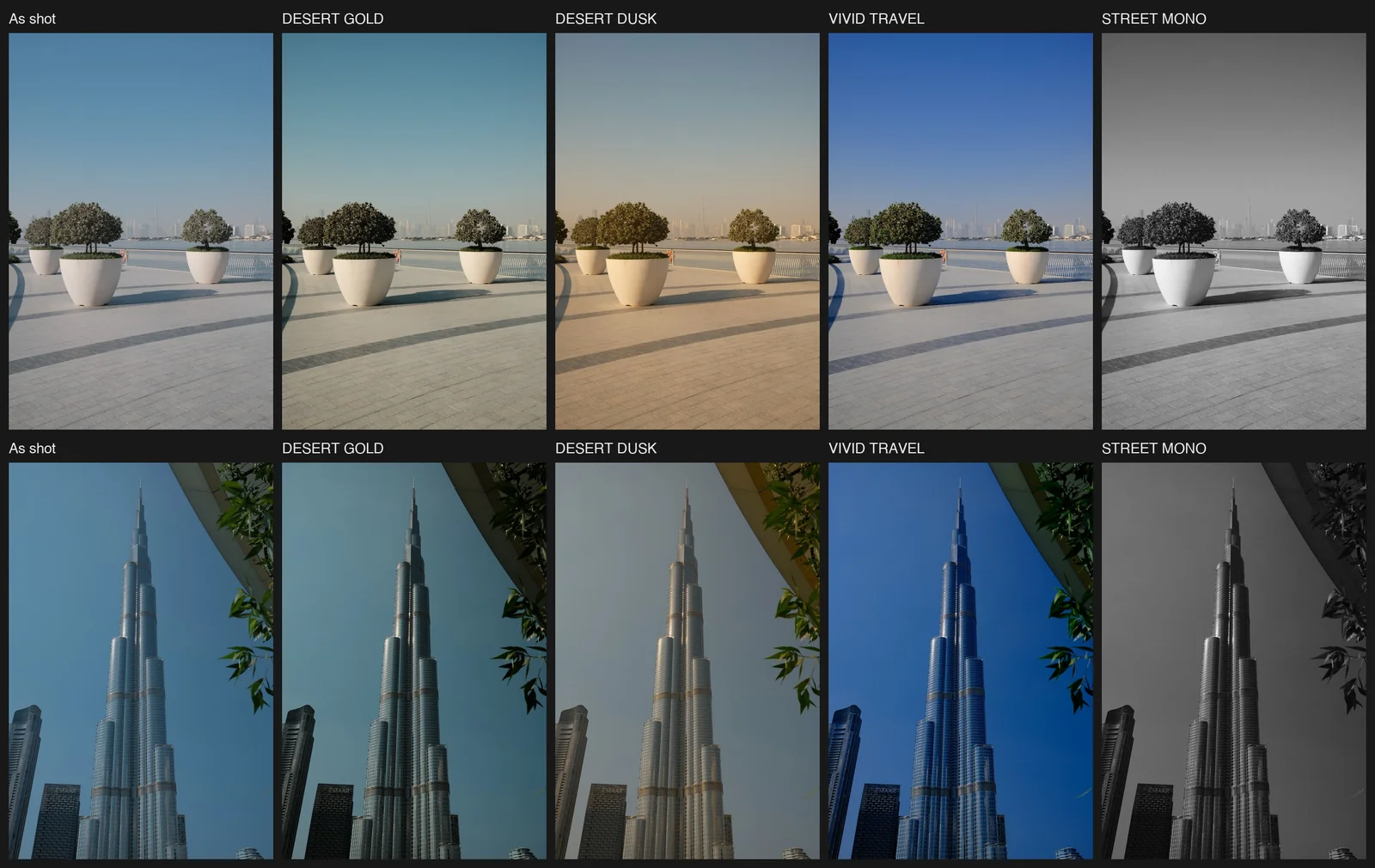
Before it writes anything to the camera the agent asks you, and if a custom setting already has a recipe in it, it won’t replace it until you clearly say yes. ISO, exposure compensation, focus and drive modes can’t be reached over USB at all, so in a recipe they are just notes and you set them on the body yourself.
Separately, about Codex. It runs commands in a sandbox, and in the sandbox there are no USB devices, so for the tool the camera looks unplugged even when it’s plugged in perfectly fine. The skill asks to run the camera commands outside of the sandbox, and if you get tired of approving it, x100vi sandbox-help prints the rules that make it stop asking.
Technical details
The firmware
The first thing Claude and I looked at was the firmware itself. The update file for version 1.31 is 109 MB, and at the beginning we thought it’s encrypted, because there was no readable string in it at all. Then it turned out the whole file is simply stored bitwise inverted, so you do a NOT over every byte and get ARM64 code and around 80,000 strings.
The firmware has two parts. One is an RTOS image, and this is the camera as you know it, with the menu and all the settings. It’s compressed with some LZ variant made by Fujifilm, and ffcompress from fffw can unpack it. The other one is Linux 4.9 which runs on a separate processor and does only Wi-Fi, FTP and Frame.io uploads. In the RTOS part we found the internal names of all the settings and their values, like MODE_FSIM_CLASSIC_CHROME or MODE_GRAIN_SIZE_BIG, plus 561 field names of the settings backup.
The idea was to make a settings backup file with the recipes inside and then restore it on the camera. But we decided it’s a bit risky, as the byte layout of the backup is not in those strings and I’m not that brave to restore a guessed file to my camera. And the user experience of creating a DAT file and restoring the camera settings from it every time would be no less annoying than clicking them in with my fingers anyway.
PTP
The camera talks PTP over USB, which is the same protocol all cameras use to give photos to a computer. Vendors put their own properties on top of it, and libgphoto2 knows about 200 of the Fujifilm ones.
In the card reader mode the X100VI shows four properties and none of them is a setting. Also, it turned out the X100VI has no tether shooting mode at all, and this is the mode where other Fujifilm bodies show their settings. So the only mode left to try was USB RAW CONV./BACKUP RESTORE, and suddenly in this mode the camera advertises 61 properties and 20 operations.
gphoto2 doesn’t help here though, because it needs property descriptors to build its configuration tree, and in this mode the camera answers with a general error to every descriptor request. So the tool has its own small PTP client on top of pyusb. And on macOS there is one more thing, the system daemon ptpcamerad grabs any PTP camera right when you plug it in, so it has to be stopped first, otherwise the tool can’t claim the interface.
What I didn’t expect was in the list of properties. Next to the known ones (for the current shooting settings) there was a block which I couldn’t find in any public table: 0xD18C selects one of the seven custom settings, 0xD18D is the name of it, and the 23 properties from 0xD18E to 0xD1A4 are the settings, i.e. you can write C1-C7 directly, value by value, and no backup file is needed.
What the registers mean
Since there are no descriptors, the camera doesn’t tell you which values a property takes, so we had to ask it in another way. The tool writes some trial value, checks if the camera took it or rejected it, and then puts the original one back. Like this we got the full range for every field, e.g. film simulation is 1 to 20, the white balance shift is from -9 to 9, Kelvin is 2500 to 10000 with a step of 10, and the name can be 25 characters long, but 26 is already rejected.
But the range doesn’t tell you which one of those 20 numbers is Classic Chrome. The names we took from libgphoto2 and from public tables, and then they had to be proven with real photos. The camera can’t shoot while it’s connected in this mode, so each round was like this:
- The tool loads seven test recipes into C1-C7, and each has a different combination of values.
- I unplug the cable and take one photo with each custom setting.
- I switch the camera to the card reader mode and plug it back.
- The tool downloads the files and compares the Fujifilm maker notes (decoded by ExifTool) with the recipes.
We needed three rounds and 22 photos of nothing in particular. 393 of 393 tags matched, and it covers all 20 film simulations, 14 white balance modes, 9 noise reduction levels and 15 image sizes. After the last round the tool put the seven custom settings back, and they were byte-identical to the snapshot it took before the very first write.
The camera also has some character, and the tool has to deal with it:
- Right after the camera goes into this mode, the register properties show you the current shooting settings, and if you write at this moment it copies them into the custom setting. So the selector always goes first.
- Grain Off keeps the grain size which was there before, so the size is written before it.
- If you change the Kelvin value, the white balance shift goes back to zero.
- The monochrome tint can be written only while a black-and-white simulation is selected, and under a color one it stays stored but hidden. To clear it, a recipe for a color simulation goes through Acros on its way.
- Noise reduction from -4 to +4 is encoded as
0x8000,0x7000,0x4000,0x3000,0x2000,0x1000,0x0000,0x6000,0x5000. I guess somebody at Fujifilm knows why.
Because of all this, after every write the tool reads the whole custom setting back and fails if the camera has something else in it. The full property map is in docs/protocol.md.
Rendering a RAF on the camera
The second half of the mode’s name is RAW conversion, and this is what X RAW Studio from Fujifilm uses. This app doesn’t have its own RAW converter, it just sends the RAF to the camera and the processor of the camera develops it. So the JPEG looks exactly the same as if the frame was shot with this recipe, because it’s the same hardware and the same code that make it.
The sequence is described in fujifilm-ptp-reference, and on the X100VI it goes like this:
- The tool uploads the RAF with two vendor operations,
0x900Cand0x900D. For a 43 MB file it’s about a second. - It reads the property
0xD185, which is the conversion profile of the frame it just uploaded, 625 bytes with the settings the photo was shot with. - It writes the profile back, but with the values of the recipe patched in, and reads it again to compare.
- It writes
0xD183and this starts the conversion, in half size or in full resolution. - It waits until a new object shows up on the camera, downloads the JPEG and deletes it from the camera.
The RAF is uploaded one time and developed one time per recipe, and nothing stays on the camera after that. To check that it really works we developed two frames with four recipes, and the maker notes of each output matched its recipe, 136 of 136 tags.
One limit I hit right away is that a RAF can’t be developed above the dynamic range it was shot with, so a DR400 recipe on a DR200 frame is rendered as DR200. The tool tells you about every setting it couldn’t apply and why, and the recipe itself stays as it was written.
The CLI
All of this lives in the x100vi command-line tool, and the skill only explains to the agent how to use it:
x100vi doctor                                # is the camera connected and in the right mode
x100vi get all                               # current settings and C1-C7 as JSON
x100vi set C3 my-look.json                   # save a recipe, refuses if C3 is occupied
x100vi backup -o my-camera.json              # everything in one file
x100vi preview shot.RAF --as-shot -r desert-gold my-look.json
Every command has --json for the agent, and every error comes with an explanation and with a fix, like the wrong USB mode with the menu path, or a RAF from some other camera. The tool doesn’t touch the firmware at all. I tested it on macOS with firmware 1.31, and on Linux and Windows it’s covered only by tests against a software camera, I didn’t try it there with a real one.