Siptooth: an emulated Bluetooth headset that answers my phones with AI
TL;DR Siptooth is a Linux daemon that pretends to be a Bluetooth headset. When the phone rings, it calls a SIP address from the config, and once that side picks up, it answers the phone and connects the two. Incoming SMS go to shell hooks. I run it on a Raspberry Pi 5 next to a phone that stays at home, and an ElevenLabs agent answers my calls.
I’m a Ukrainian living between Portugal and the UAE, which sounds glamorous until you count the phone numbers. Every country wants a local phone number from you, for the bank, the tax office, the landlord, doctors and couriers. Some of my numbers are on physical SIMs, but most of them are eSIMs now, and an eSIM is tied to one phone. You can’t just move it to another device when you need it.
Time zones make it worse. Portugal calls me when it’s late evening in Dubai, and the other way around.
Most of these calls are spam or scam, and I would gladly ignore all of them. But once in a while it’s the bank or some government office, and if I miss that call I end up with a week of back and forth over email. So muting everything is not an option for me.
The problem
Ideally, I want the following:
- A call comes to any of my numbers.
- Someone answers it and asks who is calling and why.
- If it’s important, the call reaches me, otherwise I get a note.
- All SMS from all numbers land in one place that I actually check.
Carrier call forwarding could solve part of this for physical SIMs, but every operator does it differently, some charge for it, and it doesn’t help with SMS at all.
My previous attempt was Teletext, an Android app on a spare phone that forwards SMS and calls to Telegram. For SMS it was fine, but for calls it turned out to be insufficient: all I was getting were missed call notifications.
On the phone itself it’s not possible. Neither Android nor iOS lets an app answer a regular cellular call and take its audio. I understand why (otherwise every flashlight app would be listening to your calls), but it kills the idea.
There is one exception though. Any phone will give a call to a Bluetooth headset, this is how your car or AirPods work. The phone sends the audio and accepts commands like “answer” and “hang up”, and it has no idea what is really on the other side. So I made the headset a Linux box.
How it works
Siptooth registers itself in Linux as a hands-free device using the Hands-Free Profile, same as a car kit. You pair the phone with it once, like any other headset. I use a Raspberry Pi 5, but there is nothing Pi-specific in the code, and a mini PC with a USB Bluetooth dongle works too.
When the phone rings, siptooth gets the caller’s number over Bluetooth and places a SIP call to the target from the config, with the caller’s number in a header. The phone keeps ringing at this point. Siptooth picks it up only after the SIP side answers, and then passes the audio in both directions.
This order was important for me. If my SIP provider is down or the agent doesn’t answer, the phone just keeps ringing as if siptooth wasn’t there, and the caller never hears silence or an error.
SMS work through another Bluetooth profile, MAP, the one cars use to read your messages out loud. Siptooth subscribes to new messages and sends each of them to shell hooks as JSON with the number, the contact name (if the phone knows it) and the text. Calls trigger hooks too, when the phone rings, when the call connects and when it ends. What happens after that is up to the script.
Siptooth is not my first attempt to answer calls with AI. Before it there was allochka, and it used the OpenAI Realtime API directly, with all prompts and conversation logic on the Pi. It worked, but it was tied to a single AI provider. A SIP trunk is much more universal: today it’s an ElevenLabs agent, tomorrow it can be a PBX or another AI. So siptooth only moves calls from Bluetooth to SIP, and the Bluetooth part was reused from allochka.
Challenges
Bluetooth call audio is CVSD, 8 kHz mono, which is quite an old format. Luckily, SIP providers use G.711, also 8 kHz, so there is no need for resampling, but the packets have to flow at the right pace, otherwise you get gaps and a robotic voice.
Not every Bluetooth chip gives call audio to the software. Some of them, especially in laptops, route it over a separate wire directly to the sound card, so the call connects but there is only silence. siptooth doctor now checks things like this before the first call.
The onboard Bluetooth of the Pi 5 has a strange issue. After a night of being connected, the first call in the morning was pure noise. The link looked fine and there were no errors in the logs, the controller just returned garbage, and turning the adapter off and on fixed it. I didn’t find the root cause, so siptooth does what every IT support does and turns the adapter off and on again every hour when there is no active call.
During testing from a laptop softphone, the agent’s own voice came back into the call. The agent thought it was the caller speaking and kept interrupting itself, which is impressive in its own way, but not very useful, so I added an echo gate. Later I tested from a real phone and there was no echo at all. It’s disabled in my config now, but it’s there if needed.
The agent starts talking as soon as it answers, which happens before the phone is picked up. If siptooth dropped this audio, the caller would hear only half of the greeting. So it buffers the greeting and catches up later by skipping the pauses between words.
The Pi is behind a regular home router, so I had to deal with STUN, NAT and a lot of small SIP details to get audio working in both directions. There was also a bug I would never guess: Tailscale MagicDNS breaks DNS queries that contain EDNS0, so siptooth got its own small resolver that doesn’t send it.
SMS support was the biggest part of the code. MAP runs on top of OBEX, which runs on top of RFCOMM, and to find the right channel you need SDP. I didn’t find Go libraries for this that fit, so siptooth has its own small implementations, with a lot of tests.
My setup
The phone stays at home on a charger next to the Pi, with all local numbers on it as eSIMs.
Every call goes to an ElevenLabs agent over a SIP trunk. On their side, you import the number as a SIP trunk number and assign an agent to it. The connection uses TLS and the audio is encrypted.
The siptooth config for this is short:
phone:
  number: "+351..."
sip:
  target: "sip:{number}@sip.rtc.elevenlabs.io;transport=tls"
  transport: tls
  username: "my-trunk-username"
  headers:
    X-CALLER-ID: "{caller}"
  srtp: true
The agent plays my office manager. Unlike a real one, it doesn’t mind spending the whole day talking to scammers. It answers the call, asks who is calling and why, and then either routes the call to me or takes notes. The caller’s number comes in the header, so the agent knows who is calling before they say anything. Spam and scam calls end there, and I never hear about them.
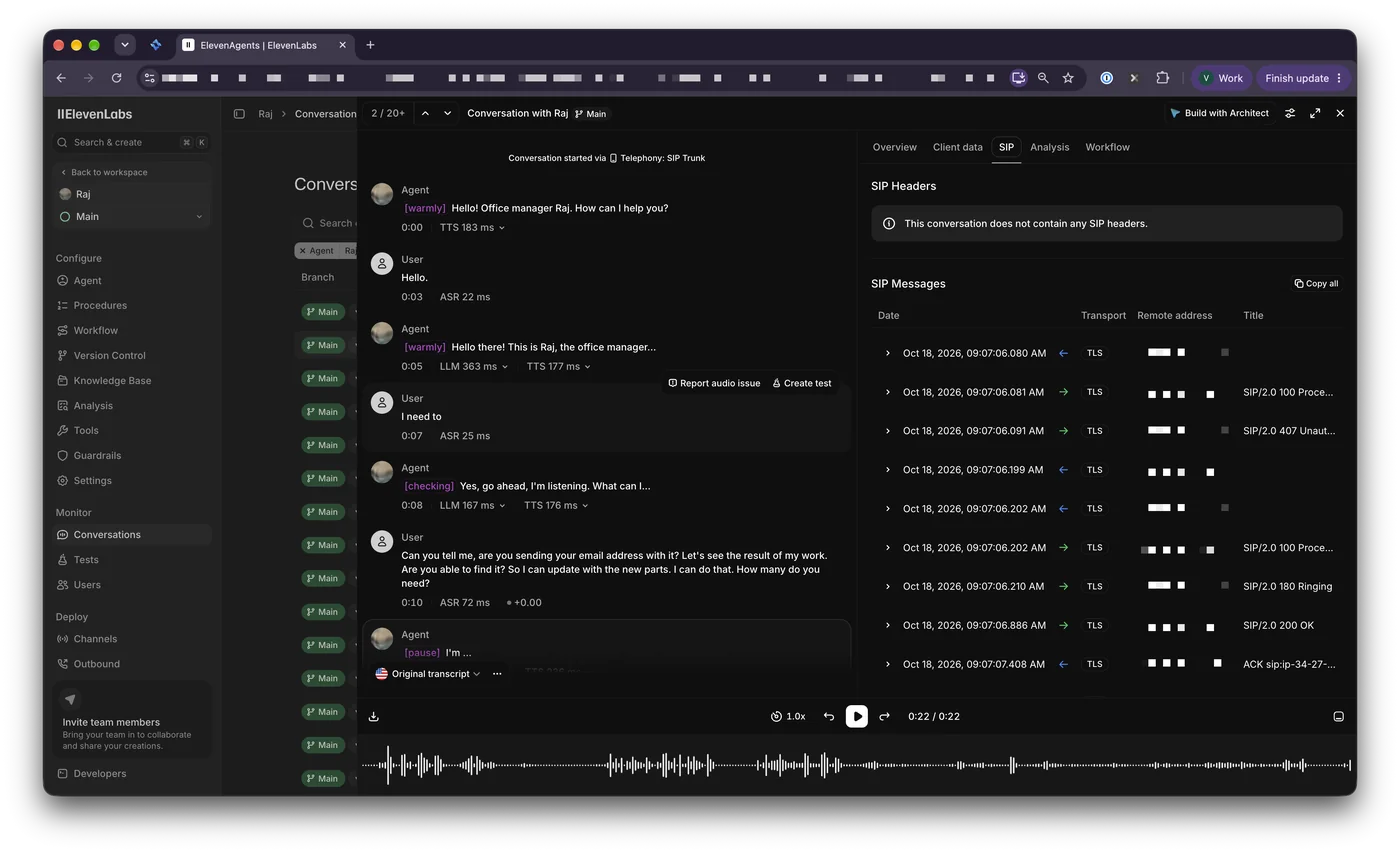
SMS go to a hook with a small Python script that forwards them to my Telegram, so bank codes and delivery notifications from all numbers end up in one chat.
Siptooth doesn’t care what is on the other side of the SIP call. Before ElevenLabs, I also tested it with Zadarma, a cloud PBX, where a call can ring another phone, go to a voice menu or to a regular voicemail.
My phone is an Android, but an iPhone uses the same Bluetooth profiles and should work the same way. The code is on GitHub, and the README has the hardware requirements.