3D atlas of my brain made of MRI scan
TL;DR I had a brain MRI and turned it into an interactive 3D model of my head that anyone can open in the browser: skull, brain regions, inflated cortex, optic nerves, inner ears and veins. Everything is built with free tools that neuroscientists use every day, and the scan, the pipeline and the viewer are on GitHub.
This is not the first time I’ve open-sourced myself. A year ago I published my DNA, the raw SNP data from Ancestry, together with a feature request list for whoever decides to clone me. A clone would also need the hardware specs, so when I got my brain MRI results, I wanted to open-source them too, in a way that people without any medical background could play with.
The clinic gave me access to a patient portal with a web viewer that shows grey slices. I wanted the actual data, so I dug into how the viewer works and found that it has a “download study” job, which is just not exposed in the interface. The job returned a 434 MB archive: 2,058 DICOM images in 23 series.
What is in an MRI study
An MRI study is a set of series made with different sequences, and each of them shows different tissue in a different way. Mine had:
- a 3D T1-weighted scan with 0.5 mm voxels, the main “anatomy” scan with good contrast between grey and white matter;
- two kinds of T2-weighted scans, where fluid is bright. One of them is a very fine 0.3 mm slab of only about 48 mm around the temporal bones, which is perfect for the inner ear;
- SWI, which is sensitive to blood and shows veins as dark lines;
- FLAIR, diffusion maps and a few ear reconstructions, which I didn’t use in the end.
The T1 is the reference for almost everything. All series share the scanner’s coordinate system, so they line up without any registration.
dcm2niix: from DICOM to something usable
DICOM is the format for clinical systems: one file per slice, with a lot of metadata. Research tools work with NIfTI, one file per 3D volume. dcm2niix converts one to the other, and for my whole study it took less than a minute.
Before publishing anything, I also cleaned the DICOM headers. They contain much more than a name: birth date, patient and accession numbers, the referring doctor, the clinic’s address and every date. A small script blanks or removes all of that and replaces every UID, and a byte-level search over all 2,058 files confirmed that none of the original identifiers are left. The cleaned files convert to exactly the same volumes. The face, of course, is still there, as it’s a 3D scan of a head. My DNA is already public anyway, so the face is the least private thing in the repository.
SynthStrip: separating the brain from everything else
Skull stripping sounds much worse than it is: it means finding which voxels are brain and which are skin, bone and everything else. SynthStrip from FreeSurfer does it with a neural network and works on almost any scan. It runs in Docker, and on Apple Silicon it took about 8 minutes under emulation. Later I used its brain mask for the veins.
FastSurfer: naming every part of the brain
FastSurfer is a deep-learning version of the FreeSurfer pipeline. It labels about 100 structures on a T1: 31 regions of the cerebral cortex per hemisphere from the DKT atlas, plus the ventricles, thalamus, basal ganglia, hippocampus, amygdala, brainstem and cerebellum. On the Mac it runs on the GPU and takes about 10 minutes at the full 0.5 mm resolution. I grouped the cortex regions into lobes, so in the viewer you can see both.
FastSurfer has three more modules that run on top of that:
- HypVINN labels the area around the hypothalamus: mammillary bodies, fornix, pituitary, pineal gland and the optic chiasm with the optic tracts. At 0.5 mm its own clean-up step silently dropped the optic tracts, because its connectivity check assumes bigger voxels, so I had to patch that check.
- CerebNet splits the cerebellum into its lobules and the vermis.
- FastSurfer-CC labels the corpus callosum, the bridge between the hemispheres, and splits it into front, body and back.
Also, FastSurfer’s helper scripts break if the path has a space in it.
SimNIBS: the skull that MRI can’t see
I wanted a real 3D model of my skull, one I can zoom in on and study, which is a rare chance while you are still using it. The problem is that bone gives almost no signal on MRI, so it’s dark, the same as air. My first attempt was to take the dark band between skin and brain, and it gave a smooth cap with holes, nothing like a skull.
SimNIBS is made for simulating brain stimulation, and for that it needs an accurate head model. Its charm tool fits a probabilistic head atlas to the T1 and T2 and labels skin, bone, fluid, eyes, muscles and blood. With it I got a real-looking skull with the face, jaw, orbits and neck vertebrae. Installing it without conda took a few hacks: wheels straight from GitHub, a patched library path for one of its modules, and a stub for a module that is only needed for simulations. One charm run takes about an hour, and running several in parallel made each of them three times slower.
I also tried charm with the FLAIR scan and with the T1 only, hoping for a smoother skull, and measured the surface roughness of all three. Both alternatives had holes in the face, a ragged jaw and about 70 cm³ of extra bone, so the original version stayed.
charm gives bone as one label, so I split it into the skull cap, skull base, face, lower jaw and upper vertebrae. The parts grow from simple landmarks like the eyes and the spinal cord, using a watershed on bone thickness, so the borders land at the jaw joints and between the skull and the spine. Upper and lower teeth touch on MRI, so the jaws are separated at the bite plane.
The optic nerves are traced in the orbit, where they are dark threads in bright fat: each nerve is the cheapest path from the back of the eye to the chiasm through dark tissue. The eye muscles are the dark tissue inside a cone from the optic canal to the eyeball. The nerves are reliable, the muscles are approximate.
TopoFit and the inflated brain
FastSurfer gives the cortex as voxels, but to unfold it I needed real surfaces. SimNIBS has a second mode, charm --surfaces, which runs TopoFit, a model that deforms a template onto the cortex and produces the inner and outer cortical surfaces as one mesh, point for point.
From there I made the “Inflate brain” slider. The surface is smoothed thousands of times, like a balloon being inflated, and the movement is recorded as sulcal depth, so you can see where the gyri and sulci were. The inflated surface keeps the real area of the cortex, about 2,110 cm², so when it unfolds, each hemisphere grows from about 165 mm to about 275 mm long. The slider shows how much brain is hidden in the folds, and it’s somewhat reassuring that there is more of it than it looks. The median cortical thickness came out at about 3 mm, which is what you’d expect.
The inner ear
The inner ear is about 1 cm across, and on the fine T2 slab its fluid is bright inside dark bone. My script searches a band on both sides of the brainstem, removes thick fluid like the cisterns and the internal auditory canal, and picks the piece that is most surrounded by bone. The result is the cochlea, the vestibule and the three semicircular canals. The auditory canal touches the cochlea, so it’s cut away as a cylinder along its axis.
Veins from SWI
On SWI, blood with little oxygen is dark, so veins look like dark tubes. The Frangi vesselness filter is made for exactly that: it finds tube-like structures of a given width. My first tries found 60 cm³ of “vessels”, which was basically the texture of the whole brain. It turned out that the SWI is skull-stripped only in its lower slices, so in the upper ones the filter lit up the scalp and the skull. With the SynthStrip mask applied, it started to make sense.
Near the air in the sinuses and ear canals, the SWI phase wraps, and exactly there the filter found fake veins. So I used the phase image as a risk map: in risky areas a piece needs about three times more evidence and has to be tube-shaped. Hysteresis thresholding keeps veins continuous, and small gaps are bridged along the vessel direction, which joined 381 pieces into 47. The large dural sinuses come from the charm blood label. The carotid arteries are dark on SWI as well, so I removed them by position.
From labels to the browser
Every label becomes a surface with marching cubes from scikit-image, then it’s simplified and smoothed with trimesh. In total that’s 167 parts and about 4 million triangles. For large morphological operations, use distance transforms instead of big structuring elements, otherwise a step that should take a minute can run for hours.
The meshes are compressed with Draco with an error of at most 0.05 mm, and the whole model is about 11 MB. The viewer is a single HTML page with three.js and no build step. three-mesh-bvh makes hovering and clicking fast across all those triangles, and every structure has a short plain explanation of what it does.
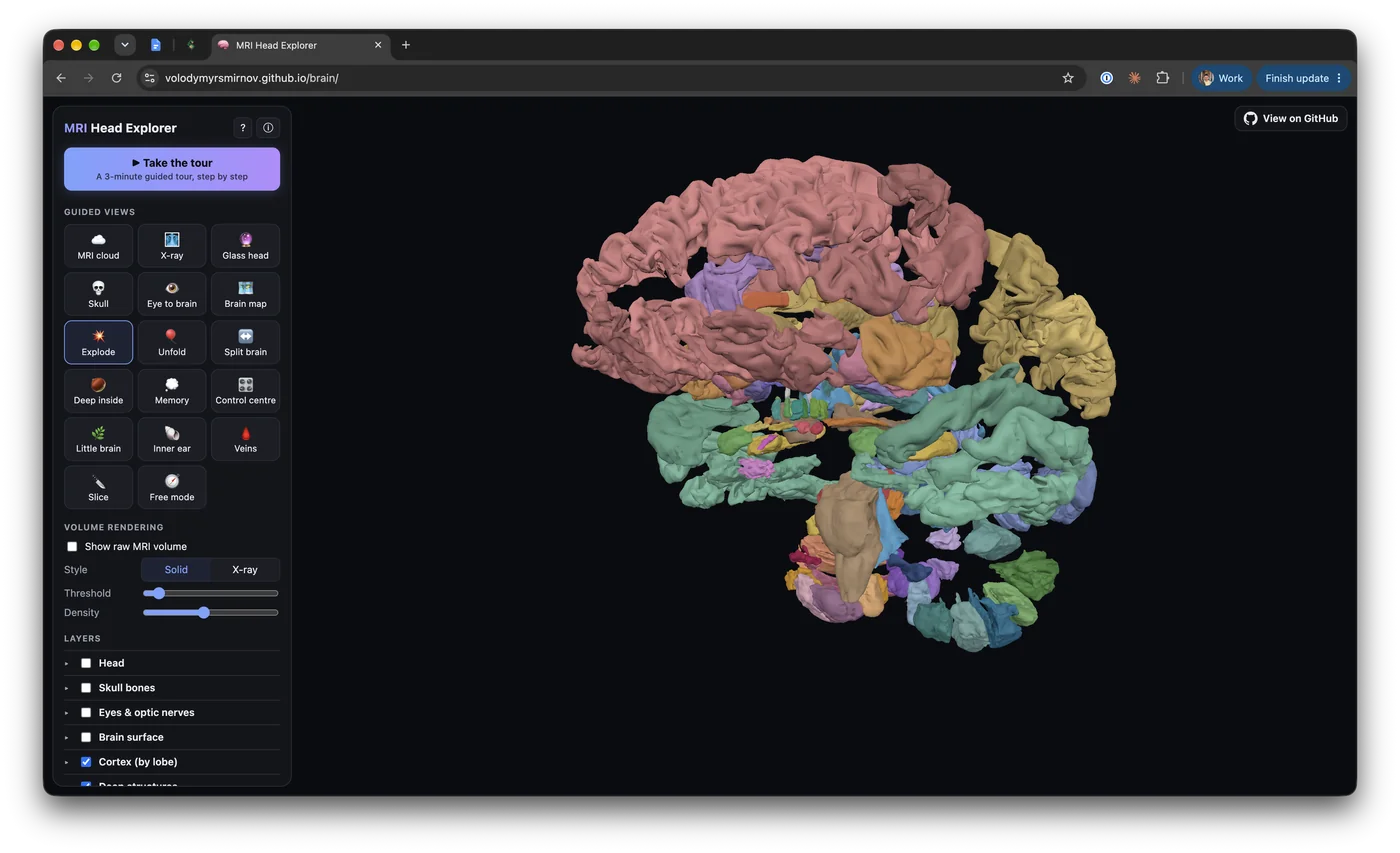
The raw MRI is shown with volume rendering, a ray marching shader over a 3D texture. When you cut the head with a plane, the cut face shows the real MRI section. There are also sliders to split the hemispheres and to “explode” the brain into separate parts, and a guided tour for people who just want to look around.
Is it reproducible?
To check that the pipeline really works, I rebuilt everything from scratch, starting from the anonymized archive, which took about 3 hours on my MacBook. FastSurfer and its modules, the inner ears and the cortical surfaces came out bit-identical. The parts made by SimNIBS were slightly different between runs, with a Dice overlap of 0.995 for the head tissues.
You can take the tour, and the README has every step if you want to do the same with your own MRI.